
Echoes of Aincrad System Requirements
 By Elias Öberg
Getting Echoes of Aincrad running smoothly isn't complicated, but it helps to know exactly what your rig needs before launch day chaos hits. Bandai Namco split the spec sheet into a few different tiers depending on the frame rate and visual preset you're chasing, so "minimum" doesn't always mean the same thing here. If you're prepping your PC, PS5, or Xbox Series X|S for Aincrad's floors ahead of time, you'll want to check storage space and GPU tier first since those trip up the most players. And if you're checking what the game costs while you get your setup ready, the Echoes of Aincrad price tracker on PriceRadar lets you compare current offers across tracked stores.
Key Features You Should Know Before Jumping In
Before you start matching your rig against the specs above, it helps to know what you're actually building your PC or console setup for. Echoes of Aincrad leans heavily into player identity and choice, so here's a quick look at what makes the game tick.
Build Your Own Hero

Instead of playing as a fixed character, you create your own avatar from scratch and shape how it looks and plays. This is the game's biggest pitch: it's your story inside Aincrad, not someone else's, and every choice you make in customization carries over into how your character grows through the floors.
Shape Your Own Growth Path
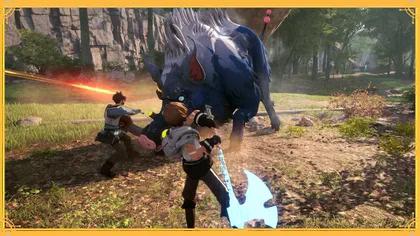
Your build isn't locked into one direction. Gear, weapons, stats, and your partner's skill set all combine to push you toward speed, raw power, or endurance, whatever fits your playstyle best. Leveling up strengthens your foundation, and building real synergy with your partner turns rough fights into much more manageable ones. This part of the game rewards experimenting rather than following one fixed formula.
Explore a Living, Expanding World
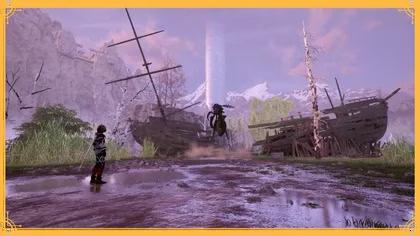
Aincrad isn't just floor after floor of combat. You'll move through varied environments, from open fields to dangerous dungeons packed with side content, picking up quests and rare loot along the way in real-time action combat. The world keeps opening up as you progress, so there's always a reason to push toward the next floor.
Minimum PC Requirements for Echoes of Aincrad
Before anything else, there are a few specs every setup needs regardless of which frame rate target you're aiming for. You'll need 8GB of memory, Windows 11, DirectX 12, and 30GB of free space on an SSD. That last part matters more than people expect, since the game is built around fast asset streaming and simply won't perform right on a traditional hard drive.
Requirement | Spec |
Memory | 8GB |
Storage | 30GB (SSD required) |
OS | Windows 11 |
DirectX | DirectX 12 |
30FPS Performance Priority Preset
This is the true entry point. An Intel Core i5-8400 or AMD Ryzen 3 3300X handles the CPU side, paired with an Nvidia GeForce GTX 1060 (6GB), AMD Radeon RX Vega 56 (8GB), or Intel Arc A750 (8GB). This tier gets you into Aincrad and keeps things playable, though don't expect buttery smooth combat during busier floor encounters.
60FPS Performance Priority Preset
Step up to an Intel Core i7-9700K or AMD Ryzen 3 3300X, and you'll want an Nvidia GeForce RTX 2060 (8GB), AMD Radeon RX 5700 (8GB), or Intel Arc B580 (12GB) to hit a stable 60 frames per second at this same performance preset. This is the sweet spot for most players who want smooth parry timing without needing a top-tier GPU.
Recommended Specs for a Smoother, Sharper Experience
If you want more visual headroom or you're planning to push into Death Game Mode's higher difficulty settings, the recommended tier gives you a lot more breathing room.
Balanced Preset (60FPS)
An Intel Core i7-10700K or AMD Ryzen 5 5600G pairs with an Nvidia GeForce RTX 2070 (8GB) or AMD Radeon RX 6700XT (12GB) here. This setup handles combat-heavy floors and busier towns without chugging.
Image Quality Priority Preset (60FPS)
Same CPU as the Balanced preset, but you'll want to jump up to an Nvidia GeForce RTX 3060 Ti (16GB) or AMD Radeon RX 6800 (16GB) if you care more about sharper textures and lighting than squeezing out every last frame.
Tier | Processor | Graphics Card |
Minimum, 30FPS | Intel i5-8400 / Ryzen 3 3300X | GTX 1060 [6GB] / RX Vega 56 [8GB] / Arc A750 [8GB] |
Minimum, 60FPS | Intel i7-9700K / Ryzen 3 3300X | RTX 2060 [8GB] / RX 5700 [8GB] / Arc B580 [12GB] |
Recommended, Balanced | Intel i7-10700K / Ryzen 5 5600G | RTX 2070 [8GB] / RX 6700XT [12GB] |
Recommended, Image Quality | Intel i7-10700K / Ryzen 5 5600G | RTX 3060 Ti [16GB] / RX 6800 [16GB] |
PS5 and Xbox Series X|S Requirements
Console players have it a lot simpler since there's no processor or graphics card shopping involved. Echoes of Aincrad only runs on PS5 and Xbox Series X|S, so if you're still on a last-gen console, this one's not playable there. You'll need a PlayStation Network account for updates and online features on PS5, and an active Xbox Game Pass Core, Standard, or Ultimate subscription if you want online multiplayer on Xbox. Storage-wise, budget somewhere around 30 to 35GB of free space, and make sure it's on the console's built-in SSD rather than an external hard drive, since load times depend heavily on fast storage.
Whichever platform you land on, it's worth checking current offers before launch week traffic makes everything slower. The Echoes of Aincrad price history on PriceRadar helps you compare tracked stores, so you're not scrambling to sort out the purchase while everyone else is already deep into the Town of Beginnings.
Steam Deck Support and Other Setup Notes
If you were hoping to take Aincrad on the go, temper your expectations for now. Steam Deck isn't officially supported at launch, and the minimum GPU requirement sits well above what the handheld's integrated graphics can handle. The game does technically boot without any workarounds, but performance takes a real hit, especially in open areas where frame rates dip noticeably and screen tearing shows up. Unless Bandai Namco patches in proper Deck support down the line, this one's better suited to a proper desktop or console setup.
Quick Tips to Make Sure Your Setup Runs Right
A few extra things worth checking before you jump into Aincrad for the first time, especially if your PC is sitting right around the minimum spec range.
Update Drivers Before Launch Day
Fresh GPU drivers usually ship alongside major game releases, and Echoes of Aincrad is no exception. Grabbing the latest driver from Nvidia, AMD, or Intel before you install the game can fix a surprising number of stutter and crash issues that otherwise get blamed on hardware.
Don't Skimp on Storage Headroom
The listed 30GB requirement is just for the base install. Leave extra room for day-one patches, save data, and any future DLC, since games in this genre tend to grow with content updates. Running an SSD with barely any free space left also slows down load times even if you technically meet the requirement.
Close Background Apps During Combat-Heavy Sessions
If you're aiming for the 60FPS tiers and notice occasional dips during busier floor fights, closing browser tabs, overlays, and recording software in the background can free up enough CPU headroom to smooth things out, especially on systems sitting closer to the minimum spec range.
Conclusion
At the end of the day, Echoes of Aincrad's requirements are pretty reasonable for a modern action RPG, as long as you've got an SSD and a GPU from the last few generations. Console players barely need to think about it beyond storage space, while PC players get real flexibility depending on whether frame rate or visual fidelity matters more to you. Double check your specs against the tier that matches your goals, clear out enough SSD space, and you'll be ready to step into Aincrad without a hitch. Once your rig's sorted, check the Echoes of Aincrad price on PriceRadar and choose the offer that fits your platform and region.
Games Mentioned

Related Articles

Echoes of Aincrad: Which Edition Offers The Best Value?
deals
CONTROL Resonant PC Performance: Requirements & Graphics Settings
guides
Phantom Blade Zero PC System Requirements: Minimum, Recommended, Ray Tracing & Path Tracing
guides
Borderlands 3 PC System Requirements And Graphics Options
guides